


Complete Guide
Patch Management: The Complete Guide
Everything IT and security teams need to know about finding, prioritizing, testing, and deploying patches - and how automation is changing each step.
Every software product you run ships with flaws. Vendors fix those flaws by releasing patches - and attackers race to exploit the systems that haven't applied them yet. That race is the entire reason patch management exists as a discipline, and it's a race most organizations are losing: exploitation of known, patchable vulnerabilities remains one of the most common ways breaches begin.
This guide covers the complete patch management picture: what it is, why it matters, how the lifecycle works, which best practices actually move the needle, and how to decide between manual, automated, and autonomous approaches.
What is Patch Management?
Patch management is the process of identifying, acquiring, prioritizing, testing, and deploying software updates - called patches - across an organization's operating systems, applications, and firmware, then verifying that those updates were applied successfully.
Vendors release patches to close security vulnerabilities, fix bugs, improve performance, and occasionally add features. Patch management is the operational discipline that ensures those fixes actually reach every endpoint, server, and device in your environment - on time, in the right order, and without breaking anything in the process.
The word patch covers more ground than most people expect. It includes the monthly cumulative updates Microsoft ships on the second Tuesday of each month, the point releases Apple and the Linux distributions publish on their own schedules, the near-continuous update streams from browser vendors, and the firmware and driver revisions that hardware manufacturers release for laptops, network gear, and peripherals. Each of these has a different delivery mechanism, a different cadence, and a different failure profile. A program that handles only one of them is not a patch management program; it is a Windows update policy.
Scale is what turns this from a chore into a discipline. Patching a single laptop is a five-minute task anyone can do. Patching ten thousand of them - spread across offices, homes, cloud regions, and time zones, running a dozen operating system versions and several hundred distinct applications, some of which cannot tolerate an unplanned reboot - is a coordination problem that touches security, IT operations, compliance, and the business calendar simultaneously.
Done well, patch management is invisible: updates flow out on a predictable rhythm, critical fixes land within hours of release, and auditors get clean reports. Done poorly, it shows up as breach headlines, failed audits, and weekend-long outage recoveries.
Why Patch Management Matters
1. It closes the door attackers use most
The majority of successful cyberattacks exploit vulnerabilities that were publicly known - often with a patch already available - before the attack occurred. WannaCry infected hundreds of thousands of machines through a Windows flaw Microsoft had patched weeks earlier. The Equifax breach traced back to an unpatched Apache Struts vulnerability. The pattern repeats yearly because attackers automate scanning for unpatched, internet-facing systems: the moment a vulnerability is disclosed, the countdown starts.
The asymmetry is what makes this so punishing. An attacker needs to find one unpatched system; a defender needs to patch all of them. Public disclosure hands both sides the same information at the same moment, but the attacker can weaponize it against every organization on the internet in parallel, while each defender works through their own backlog serially. Automated exploitation kits industrialize that advantage, turning a fresh CVE into an internet-wide scan within hours.
The window between disclosure and active exploitation keeps shrinking - for many critical CVEs it is now measured in days, sometimes hours. Patch velocity has become a direct proxy for security posture. If your organization takes three weeks to deploy a critical patch, you are not running a three-week SLA; you are accepting three weeks of known, remotely exploitable exposure on every affected asset.
2. It's a compliance requirement, not a suggestion
Nearly every major regulatory framework mandates timely patching:
- PCI DSS requires critical security patches within one month of release, and expects a documented process for identifying and ranking newly discovered vulnerabilities.
- HIPAA requires covered entities to protect systems handling patient data, which regulators interpret to include current patch levels as part of a reasonable security-management process.
- CIS Controls (Control 7) and NIST frameworks both make continuous vulnerability remediation a core safeguard, with explicit expectations around automated patching for both operating systems and applications.
- Cyber-insurance underwriters increasingly ask for documented patch SLAs and compliance evidence before issuing or renewing policies - and increasingly deny claims where an unpatched, known vulnerability was the entry point.
Missing a patch window is not just a security gap - it is audit findings, fines, and premium increases. Worse, most frameworks ask you to prove the patch landed, not merely that you pushed it. That distinction turns verification and reporting from a nice-to-have into the part of the program auditors examine first.
Related
3. It keeps systems stable and users productive
Patches do not only fix security holes. They resolve memory leaks, crashes, compatibility problems, and performance degradation. An environment on current patch levels generates fewer help-desk tickets, fewer emergency outages, and fewer “it works on my machine” mysteries.
There is a compounding effect here that rarely appears on a risk register. Every month a fleet drifts further behind, the gap between the version you run and the version the vendor supports widens. Eventually you are troubleshooting bugs that were fixed two years ago, reproducing issues nobody upstream can reproduce, and applying a backlog of updates so large that deploying it becomes its own high-risk project. Staying current is cheaper than catching up.
4. It's cheaper than the alternative
The cost of a disciplined patch program - tooling, staff time, maintenance windows - is a rounding error next to the cost of a single breach, a ransomware recovery, or a compliance penalty. Ransomware recovery costs are dominated by downtime, not ransom: lost revenue, idle staff, incident-response retainers, forensic investigation, regulatory notification, and the engineering months spent rebuilding trust in systems you can no longer assume are clean.
Patching is one of the few security investments with a defensible, unglamorous return: it reduces the number of ways an incident can start. It does not stop phishing, insider misuse, or a zero-day. It removes the category of incident that begins with a vulnerability someone already told you how to fix.
Types of Patches
Not all updates are equal, and knowing the difference shapes how you prioritize. The five categories below differ in urgency, in how much testing they deserve, and in how likely they are to change behavior your users depend on.
Security patches
Fix specific vulnerabilities, usually tracked as CVEs. These carry the highest urgency, especially when the vulnerability is being actively exploited.
Bug-fix patches
Correct functional defects - crashes, errors, broken features. Important for stability, rarely urgent for security.
Feature updates
Add or change functionality. These need the most testing because they are most likely to change behavior your users or integrations depend on.
Hotfixes
Urgent, narrowly scoped fixes released outside the normal cycle. They often skip parts of the vendor's own QA, which is exactly why your testing matters before broad rollout.
Service packs / cumulative updates
Bundle many prior patches into one package - common in Microsoft ecosystems, where monthly cumulative updates have largely replaced individual patches.
The practical consequence of this taxonomy is that urgency and testing burden run in opposite directions. A security patch for an actively exploited flaw is the one you most want to deploy immediately and the one you have the least time to test. A feature update is the one you least need to rush and the one most likely to break something. Programs that apply a single, uniform process to both end up either shipping risky changes fast or shipping urgent fixes slowly.
Cumulative updates complicate this further. Because they bundle security fixes together with functional changes, you cannot take the security content without also taking behavior changes. That is a deliberate vendor choice, and it means the testing you skip on a “routine” cumulative update is testing you skipped on a feature update.
A second axis matters just as much: what gets patched. Operating system patches (Windows, macOS, Linux) get most of the attention, but third-party applications - browsers, PDF readers, collaboration tools, runtimes like Java - account for a large share of exploited vulnerabilities and are the most commonly neglected category. Firmware, drivers, and network device updates round out the surface. An OS-only patching program is roughly half a patching program.
Third-party coverage is neglected for a structural reason, not a lack of awareness: operating system vendors provide a patching channel, and application vendors mostly do not. Each application ships its own updater, its own release notes, and its own definition of a security release. Closing that gap by hand means one person tracking hundreds of release feeds. Closing it with tooling means choosing a platform whose application catalog actually covers the software your organization runs - which is why catalog size is a real evaluation criterion rather than a marketing statistic.









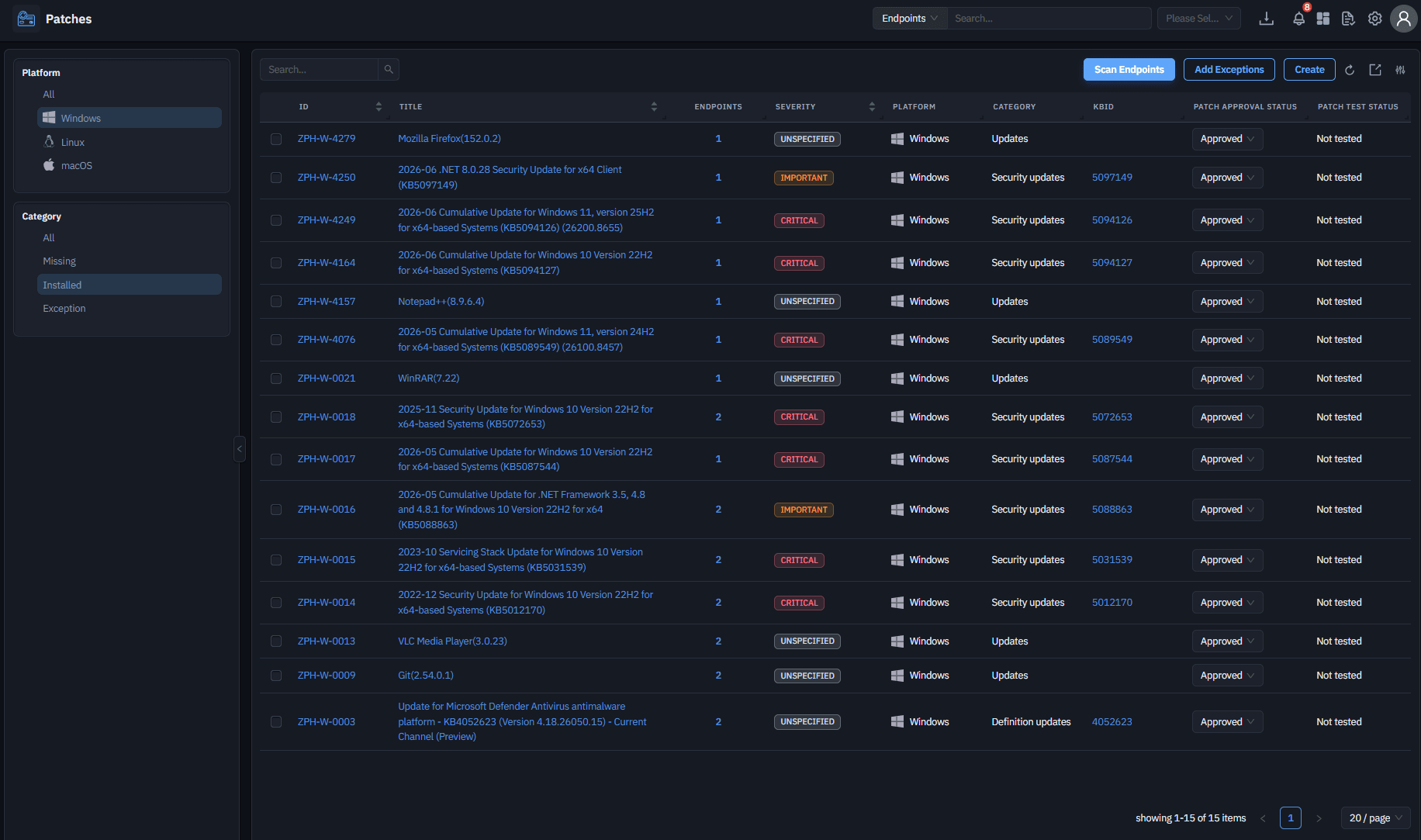
A complete program patches every operating system in the fleet - not just the dominant one.
The Patch Management Lifecycle
Patch management is not a task; it is a loop that runs continuously. The lifecycle below is the industry-standard model, and every stage has a failure mode worth knowing - because in practice, programs rarely fail at patching. They fail at one specific stage, quietly, for months.
Stage 1: Discover and inventory
You cannot patch what you cannot see. Build and maintain a live inventory of every asset - servers, workstations, laptops, VMs, remote endpoints - along with OS versions and installed software. In modern environments with remote work and BYOD, this must be continuous discovery, not an annual spreadsheet exercise. Unknown assets are unpatched assets.
Inventory has to capture more than a hostname. Patch decisions depend on knowing the operating system build, the installed application versions, who uses the machine, how critical it is, and whether it is exposed to the internet. Without that context, Stage 3 has nothing to prioritize with.
Stage 2: Identify missing patches
Scan the inventory against vendor releases and vulnerability databases to determine which patches each asset is missing. This means tracking Microsoft's Patch Tuesday, Apple and Linux distribution updates, and release feeds for every third-party application in the environment - a volume no human team tracks manually at scale.
The output of this stage should be a per-asset list of missing patches mapped to the vulnerabilities each one closes. That mapping is what lets you answer the question leadership actually asks after a disclosure: not “are we patched?” but “which of our systems are exposed to this specific CVE, and how long until they are not?”
Stage 3: Prioritize by risk
This is where mature programs separate from checkbox programs. Deciding order of deployment should weigh:
- Severity (CVSS score) - how bad is the vulnerability on paper? CVSS describes worst-case technical impact under ideal conditions for the attacker. It says nothing about whether anyone is actually attacking it.
- Exploit likelihood (EPSS) - what is the statistical probability it will actually be exploited? EPSS scores the odds of exploitation in the near term, which is a very different question from how damaging exploitation would be.
- Active exploitation (CISA KEV catalog) - is it already being exploited in the wild? A KEV listing turns a theoretical risk into an observed one, and should short-circuit normal scheduling.
- Asset criticality and exposure - is the vulnerable system internet-facing? Does it hold sensitive data? Is it reachable from an untrusted network, or does exploiting it first require a foothold you would already consider a breach?
Used alone, CVSS produces the classic dysfunction: a queue of hundreds of critical-severity patches, sorted by a number that ignores whether anyone is exploiting them, on assets whose exposure nobody checked. Combining severity with exploit intelligence and asset context collapses that queue into a short list of patches that genuinely reduce risk this week.
A medium-severity flaw on your internet-facing VPN gateway can matter far more than a critical-severity flaw on an isolated lab machine. Risk-based prioritization is the single highest-leverage improvement most patch programs can make.
Stage 4: Test before you trust
Patches occasionally break things - driver conflicts, application incompatibilities, boot failures. Testing in a controlled group that mirrors production configurations catches these before they become organization-wide incidents.
The value of a test group is proportional to how well it mirrors production. A pilot ring made entirely of IT staff laptops will validate that the patch installs; it will not surface the conflict with the legacy application that only the finance team runs. Representativeness beats size.
Stage 5: Deploy in rings
Rather than pushing a patch everywhere at once, mature teams deploy progressively:
- 1Ring 0
Validation
Test the patch on a small, controlled set of devices before wider deployment.
- 2Ring 1
Pilot group
A representative slice of real users and configurations.
- 3Ring 2
Broad deployment
The general population, often in waves.
- 4Ring 3
Critical systems
Servers and business-critical machines last, once confidence is established.
Each ring acts as a tripwire: if failure rates spike, deployment halts automatically before the blast radius grows. Ring-based deployment is how organizations reconcile the two competing demands of patching - speed and safety. Speed is bought by starting immediately; safety is bought by expanding gradually and defining, in advance, the failure rate that stops the rollout.
The promotion criteria between rings matter more than the rings themselves. “Wait 48 hours” is a schedule, not a gate. “Wait 48 hours and require a 98% first-pass install rate with no increase in crash telemetry” is a gate. Only the second one can stop a bad patch without a human noticing first.
Stage 6: Verify, report, document
Deployment is not done when the patch is pushed; it is done when installation is confirmed on every target. Verification scans catch failed installs and machines that were offline during the window. Compliance reports document patch levels, SLA adherence, and exceptions - the evidence auditors ask for and leadership needs to see risk trending down.
This is the stage most programs treat as paperwork, and it is the stage that determines whether the previous five accomplished anything. A patch that was deployed to a machine that was asleep is not a patch that was applied. Reporting a 97% compliance rate that counts pushed rather than confirmed installs is not a compliance rate; it is a deployment rate wearing a costume.
Then the loop restarts. Vendors release new patches, new assets join the network, and Stage 1 begins again. The lifecycle has no terminal state - which is precisely why the stages that depend on sustained human attention are the ones that decay first.
Patch Management vs. Vulnerability Management
The two terms get used interchangeably, but they are different disciplines with a parent-child relationship.
| Vulnerability management | Patch management | |
|---|---|---|
| Scope | All security weaknesses: missing patches, misconfigurations, weak credentials, exposed services, end-of-life software. | One remediation pathway within that practice - the one that applies when a vendor fix exists. |
| Core question | What is exposed, and how badly? | How do we close it, safely, at scale? |
| Output | A prioritized picture of what is exposed. | A confirmed change that closes the exposure. |
| Typical owner | Security team. | IT operations team. |
| When it does not apply | Rarely - nearly everything is assessable. | Zero-days and abandoned software have no patch to apply. |
Not every vulnerability has a patch (zero-days, abandoned software), and not every patch addresses a vulnerability (feature updates, bug fixes). When no patch exists, vulnerability management turns to compensating controls: network segmentation, configuration hardening, or temporary mitigations until a fix ships.
The organizational split is where this gets expensive. Vulnerability management usually reports to security; patch management usually reports to IT operations. Security is measured on findings closed; operations is measured on uptime. Those two incentives point in opposite directions on the exact question that matters most - how fast to deploy a risky patch to a critical server.
The practical takeaway: the two programs must share data. Your vulnerability scanner tells you what is exposed; your patching system closes the gap; verification confirms the loop closed. When they run in separate silos with separate tools and separate teams, vulnerabilities fall in the gap between them - the scanner reports a finding, the patch team deploys something, and nobody re-scans to confirm the finding is actually gone.
Patch Management Best Practices
The practices below are ordered roughly by leverage. The first three change outcomes more than the rest combined, because they determine what gets patched at all - the remainder determine how safely.
- Write the policy down. A formal patch management policy defines patch SLAs by severity (e.g. critical within 72 hours, high within 7 days, moderate within 30), assigns ownership, sets maintenance windows, and documents the exception process. Without a written policy, patching becomes a matter of individual habit - and audits become improvisation. The policy is also what lets an engineer deploy an urgent patch at 2 a.m. without convening a meeting, because the decision was made in advance.
- Inventory continuously. Asset discovery should run automatically and constantly. Every gap in the inventory is a gap in coverage, and gaps skew every metric you report: a 99% compliance rate across the assets you know about says nothing about the ones you do not.
- Prioritize by real-world risk, not just severity scores.Combine CVSS with exploit intelligence (EPSS, KEV) and asset context. Patch the exploited-in-the-wild medium before the theoretical critical. This single change typically shrinks the “must patch now” queue by an order of magnitude, which is what makes the rest of the program achievable.
- Cover third-party applications, not just the OS. Browsers, runtimes, and productivity apps are the soft underbelly of most environments. Measure your coverage as a percentage of installed software titles, not as a binary yes/no.
- Test with a pilot group, always.Even “safe” cumulative updates deserve a canary ring. The cost of a 24-hour pilot delay is trivial; the cost of a fleet-wide bad patch is not. Make the pilot group representative of production, not merely convenient.
- Deploy progressively with automated halt conditions. Rings with health checks between them. If Ring 1 shows elevated failures, the rollout stops itself. Define the halt threshold before the deployment, not during the incident.
- Have a rollback plan before you deploy. Know how you would reverse each patch class - and test that the rollback actually works. Some patches cannot be cleanly uninstalled; for those, the rollback plan is a restore plan, and you should know that before you need it.
- Verify installation; never assume it. Failed installs are common. Offline devices miss windows. Verification scans and retry logic close the loop, and the metric you report should count confirmed installs only.
- Schedule around the business. Patch windows during low-usage hours, staggered across time zones, with user-facing communication for anything requiring reboots. A patch users defer indefinitely is not deployed, however green the dashboard.
- Measure and report. Track mean time to patch (MTTP), patch compliance rate, first-pass success rate, and SLA adherence. Trend them over time rather than reporting a snapshot - leadership funds a curve that is moving, not a number that is merely high. What gets measured gets funded.
Common Patch Management Challenges
Almost every struggling patch program is struggling for one of six reasons. They are worth naming precisely, because each has a different remedy - and because most teams misdiagnose a process problem as a tooling problem, or a tooling problem as a discipline problem.
Volume and velocity
Thousands of new CVEs are disclosed yearly, and vendors ship patches continuously. Teams that triage manually drown; the backlog itself becomes a risk register.
Heterogeneous environments
Windows, macOS, and Linux each have different update mechanisms, and hundreds of third-party apps each have their own release cadence. Managing them with separate tools multiplies effort and creates blind spots.
Remote and hybrid workforces
Devices that rarely touch the corporate network - or only via VPN - miss traditional patch windows. Modern patching must reach endpoints wherever they are, over the internet, without requiring VPN connectivity.
Fear of breaking things
Every experienced admin has a scar from a patch that took down production. That institutional memory creates hesitancy, which creates delay, which creates exposure. The cure is process (testing, rings, rollback), not avoidance.
Downtime constraints
Servers with tight maintenance windows and 24/7 operations leave little room for reboots. Patching becomes a negotiation with the business.
Resource limits
Patch management is unglamorous, repetitive work competing for the same IT hours as projects and tickets. It reliably loses - unless it is automated.
These challenges compound rather than add. Volume makes prioritization harder; poor prioritization means more patches deployed; more deployments mean more breakage; breakage feeds the fear that slows the next rollout; the slowdown grows the backlog, which increases volume. Programs rarely fail because one of these is severe. They fail because four of them are moderate at the same time.
Manual vs. Automated vs. Autonomous Patch Management
Patch management has evolved through three generations, and knowing where your program sits tells you where your risk sits. The distinction is not how much software you own - it is which decisions a human still has to make.
| Generation | What the software does | What humans still do |
|---|---|---|
| Manual | Little to nothing. Admins track bulletins and push patches by hand via WSUS, scripts, or touching machines. | Everything - tracking, deciding, deploying, verifying. |
| Automated | Scans, downloads, schedules, and deploys according to rules humans define. | Every judgment call: what to prioritize, when to approve, whether a rollout is going wrong. |
| Autonomous | Prioritizes dynamically, orchestrates rings, self-corrects mid-rollout, and generates compliance evidence. | Set risk tolerances and review exceptions. |
Manual patching
Admins track vendor bulletins, decide what applies, and push patches by hand - via WSUS, scripts, or literally touching machines. Viable below roughly 50 endpoints; beyond that, coverage gaps and delays are mathematically inevitable. Human error compounds: missed bulletins, skipped machines, unverified installs.
The tell that a program is still effectively manual is that patch velocity depends on who is in the office. If one engineer's vacation delays a critical rollout, the process lives in that engineer's head rather than in a system.
Automated patch management
Software handles scanning, downloading, scheduling, and deployment according to rules humans define. This is today's mainstream: policies like “auto-approve critical security patches after a 3-day pilot, deploy in maintenance windows” execute without manual intervention. Automation solves the labor problem - but humans still make every judgment call.
That distinction is easy to miss, because an automated program looks finished. Patches flow, dashboards are green, and nobody touches a machine. What is still manual is the thinking: someone decided that three days was the right pilot length, that critical meant CVSS 9.0 and above, and that this server belonged in the last ring. Those rules were correct when written and quietly decay as the environment and the threat landscape change around them.
Autonomous patch management
The emerging generation applies AI to the judgment layer itself. Instead of executing static rules, autonomous systems:
- Prioritize dynamically- correlating CVSS severity, EPSS exploit probability, KEV active-exploitation status, and each asset's exposure to decide what genuinely matters in your environment, recalculated as threat intelligence changes.
- Orchestrate deployments - selecting ring progressions and windows based on observed device usage patterns rather than fixed schedules.
- Self-monitor and self-correct - detecting elevated failure rates mid-rollout, halting automatically, and rolling back without waiting for a human to notice a dashboard.
- Document everything - generating the compliance evidence trail as a byproduct of operation rather than a quarterly scramble.
Autonomy is not the absence of human control; it is the relocation of it. Instead of approving individual patches, you define the risk tolerance - how much exploit probability justifies bypassing a maintenance window, which systems always require sign-off, what failure rate halts a rollout. The system executes inside those bounds and escalates when it needs to leave them.
The human role shifts from operator to supervisor: setting risk tolerances and reviewing exceptions instead of approving every patch by hand. For lean IT teams facing enterprise-scale patch volume, this shift is less a luxury than the only sustainable path - and it is the model behind Trinetri's autonomous patch management.
How to Choose a Patch Management Solution
Most patch management tools demo well, because a demo shows a patch deploying to a healthy machine on a good day. The criteria below are the ones that separate contenders once the environment is messy and the patch is urgent.
- Coverage breadth. Does it patch Windows, macOS, and Linux from one console? How large is its third-party application catalog - hundreds of titles, or thousands? Every unsupported app is a manual process you keep. Ask for the catalog as a list and check it against your own software inventory.
- Risk-based prioritization. Does it ingest exploit intelligence (EPSS, KEV) and asset context, or does it only sort by CVSS? Can it show you what to patch first rather than just what is missing?
- Deployment safety. Native ring-based rollout support, automated halt conditions, and one-click rollback. Ask vendors to demo a failed-patch scenario, not just a happy path - specifically, ask them to show the rollout stopping itself.
- Remote-first architecture. Agent-based patching that works over the internet without VPN, for devices that never touch the office network. Ask what happens to a laptop that is offline for three weeks and then reconnects.
- Verification and reporting. Automated post-deployment verification, retry handling for offline devices, and audit-ready compliance reports mapped to frameworks you are actually held to (PCI DSS, HIPAA, CIS, NIST). Confirm the reports distinguish confirmed installs from attempted ones.
- Automation depth.Can you define end-to-end policies (detect → test → approve → deploy → verify) that run without touching each patch? Is there AI-driven assistance for prioritization and anomaly detection, or is “automation” just scheduling?
- Integration.Does patching share data with vulnerability scanning and asset inventory, or will you be reconciling three tools' spreadsheets? A patch tool that cannot close a scanner finding leaves the loop open.
- Total cost of operation. Not license price - the hours your team will spend operating it. A cheaper tool that needs a full-time babysitter is the expensive option.
Whatever you shortlist, run the proof of concept against your messiest population rather than a clean pilot group: the remote laptops, the legacy application server, the Linux boxes nobody has logged into for a year. A tool that handles those handles everything else. A tool evaluated only on well-behaved machines tells you nothing you did not already know.

Frequently Asked Questions
It is the organized process of keeping all your software up to date - finding out which updates are missing across your computers, deciding which matter most, testing them, installing them, and confirming they worked.
It depends on severity. Critical security patches for actively exploited vulnerabilities should deploy within hours to days. Routine security updates typically follow a monthly cycle aligned to vendor releases like Microsoft's Patch Tuesday. Your patch policy should define explicit SLAs per severity level.
A formal document defining how your organization handles patching: timelines by severity, roles and responsibilities, testing requirements, maintenance windows, exception handling, and reporting. It is also a standard artifact auditors request.
Vulnerability management is the broader practice of finding and fixing all security weaknesses. Patch management is the subset focused on applying vendor software updates. Patching is the most common remediation, but not every vulnerability has a patch.
The mechanical work - scanning, downloading, scheduling, deploying, verifying - can be automated today. Newer autonomous platforms also automate the decision layer, using AI to prioritize by real-world risk and to halt or roll back problematic deployments. Most organizations keep humans supervising exceptions and approving changes to high-criticality systems.
Vendors cannot test against every hardware, driver, and software combination in the wild. A patch that is fine on most machines can conflict with a specific driver or legacy application on yours. This is exactly why pilot testing and ring-based deployment exist.
A mature process detects the failure through verification scanning, retries automatically, and flags persistent failures for investigation. Silent failures - patches assumed installed but never verified - are among the most common hidden gaps in patch programs.